

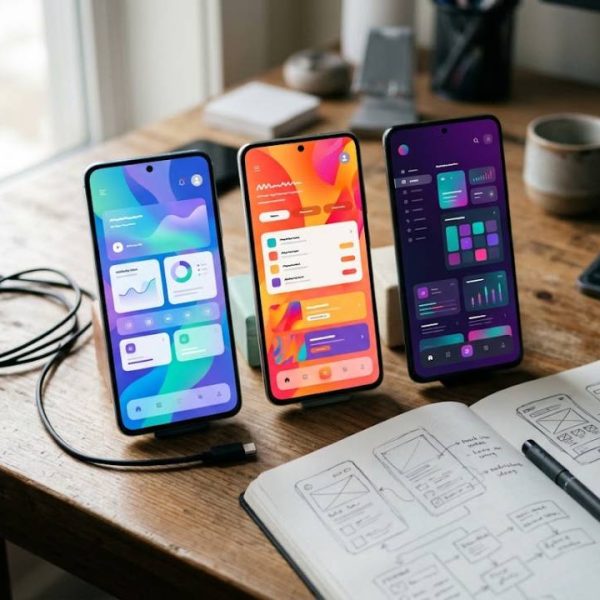
A phone app can go from idea to global release in a few months. The code compiles, the stores approve it, and users in dozens of countries can download it overnight. That reach is exciting, and it brings a quiet problem. Each new market expects an app that speaks its language, respects its habits, and works with its payment methods. Teams that treat this as an afterthought end up with a mess of late changes and unhappy reviews.
This guide explains how to localize phone apps for new markets without chaos, from the first design to the update cycle.
Design for Localization From Day One
The easiest time to prepare an app for other languages is before it is built. Keep all text out of the code, use resource files, and avoid joining sentence pieces together, because word order differs across languages. Leave room in layouts for longer words, and test with languages that read right to left.
Platform documentation, such as the Android developer resources, explains how to organize strings, plurals, and formats correctly.
Choose Markets With Care
Every language adds testing, support, and updates. Use data to decide where to start: store analytics, search volume, user requests, and competitor presence. Begin with a small set of markets, learn from them, and expand when the process runs smoothly.
Do not forget regional differences. The same language can require different wording in different countries.
Write Strings That Translators Can Understand
Short fragments without context cause errors. Add notes that explain where each string appears, what the user is doing, and any limits on length. Screenshots help a great deal. Avoid humor, idioms, and abbreviations that are hard to translate, and keep a consistent style for buttons and messages.
Prepare Plurals, Dates, and Numbers
Languages handle plurals differently, and some have several forms. Dates, times, currencies, and number formats also vary. Use platform tools that adapt these automatically, and never hardcode formats. A price shown in the wrong format can scare away customers, and a date written the wrong way can cause missed appointments.
Slavic Languages Add Complexity
Languages such as Croatian use grammatical cases, which change word endings depending on a word's role in the sentence. A string that works in English as a fixed phrase may need several forms in Croatian. Teams entering these markets often work with specialist croatian translation services to handle interface text, store descriptions, and support articles correctly.
Do Not Forget the Store Listing
The app store page is often the first impression. Translate the title, description, keywords, screenshots, and release notes, and adapt them to local search habits. Many users decide within seconds, and a poor translation here costs downloads. This overview of website localization shows principles that apply equally to landing pages and store listings.
Support Local Payment and Legal Needs
Check which payment methods people use, what taxes apply, and which privacy rules must be shown. Terms of service and privacy policies must be accurate in each language, since errors can cause legal problems. Have them reviewed by qualified professionals.
Test on Real Devices in Each Language
Automatic checks cannot replace a person using the app. Native speakers should walk through the main flows and look for cut-off text, mixed languages, confusing wording, and layout problems. Test on several screen sizes, since long words often break small screens.
Build a Continuous Workflow
Each update adds or changes text. Connect the code repository to the translation process so that new strings are flagged automatically, translated, and returned before release. Without automation, versions drift apart and users see a mix of old and new text.
Provide Support in the User's Language
Users who write to support expect answers they can read. Prepare templates and a help center for each language, and train staff or partners to respond. Even simple replies in the local language raise ratings and reduce refunds.
Listen to Reviews
App reviews reveal language problems quickly. Read them in each language, collect recurring comments, and fix the wording in the next update. Reply politely and thank users for feedback, since public replies show that the team cares.
Measure Success by Market
Track downloads, retention, and revenue for each language. Compare them with your expectations, and decide where to invest more. Data from small launches gives you a calm way to plan the next round of languages.
Plan for App Updates
Every release brings new strings, new screenshots and new store descriptions. Keep a simple checklist so nothing slips through when the next version ships.
List every screen that changed, mark the text that moved, and send only those parts for review. This keeps costs low and keeps all markets on the same version at the same time.
A short note for reviewers about tone, character limits and button names saves many rounds of corrections later on.
Final Thoughts
Localization is not a last-minute task. Plan it early, write clear strings, work with qualified linguists, and test in real use. Teams that do this release apps that feel local from the first tap.
Recent Posts
Can Your Phone Really Measure ...

Why Android Phones Are Becomin...

How Editing and Proofreading I...

AI Tools Behind the Latest Pho...

Innovating Health with Medical...

Apps Mobiles Uniques pour Mesu...
Share it.

Links
We use cookies
We use cookies to give you the best online experience, remember your preferences, and understand how the site is used. You can accept all cookies, reject optional ones, or choose which categories to allow.
Privacy PolicyCookie preferences
Choose which cookies we can use. Necessary cookies stay on because the site cannot work without them.
For more details, read our Privacy Policy.